

 個人向けトップ > お客様サポート >
  ソフトウェア > SOUNDSLAYER Engine > ダウンロード
 SOUNDSLAYER Engine | ダウンロード
SOUNDSLAYER Engine | Download
SOUNDSLAYER Engine | ダウンロード
SOUNDSLAYER Engine | Download
SOUNDSLAYER Engine | ダウンロード
SOUNDSLAYER Engine | Download
公開履歴
Download
|
2026年10月20日
October 20, 2026
|
SOUNDSLAYER Engine v2.2.1 ソフトウェアを公開(macOS)
SOUNDSLAYER Engine v2.2.1 software released (macOS)
|
|
2026年2月9日
February 9, 2026
|
SOUNDSLAYER Engine v2.2.0 ソフトウェアを公開(Windows,macOS,Android,iOS)
SOUNDSLAYER Engine v2.2.0 software released (Windows,macOS,Android,iOS)
|
|
2025年12月1日
December 1, 2025
|
SOUNDSLAYER Engine v2.1.0 ソフトウェアを公開(Windows,macOS)
SOUNDSLAYER Engine v2.1.0 software released (Windows,macOS)
|
|
2025年06月16日
June 16, 2025
|
SOUNDSLAYER Engine v2.0.0 ソフトウェアを公開(macOS)
SOUNDSLAYER Engine v2.0.0 software released (macOS)
|
|
2025年06月09日
June 09, 2025
|
SOUNDSLAYER Engine v2.0.0 ソフトウェアを公開(Windows,Android,iOS)
SOUNDSLAYER Engine v2.0.0 software released (Windows, Android, iOS)
|
|
2023年11月06日
Nov. 06, 2023
|
SOUNDSLAYER Engine V1.0.0 ソフトウェアを公開
SOUNDSLAYER Engine V1.0.0 software is available
|
SOUNDSLAYER Engineアプリの概要
SOUNDSLAYER Engine App Summary
SOUNDSLAYER Engineアプリは、Windows、macOS、Android、iOSの4つのプラットフォームでご利用いただけます。
各プラットフォームに対応する製品と機能の一覧は以下の通りです。
各プラットフォームに対応する製品と機能の一覧は以下の通りです。
The SOUNDSLAYER Engine app is available for use on four platforms: Windows, macOS, Android, and
iOS.
Below is a list of the products and features supported by each platform.
Below is a list of the products and features supported by each platform.
|
SC-GNW10S-BH
SC-GNW10S-FF SC-GNW10S SC-GNW10 SC-GNW10
|
SC-GNW30 |
接続
Connection
|
バージョン
Version
|
||
| Windows | 〇 | 〇 | USB | v2.2.0 |
ダウンロード
Download
|
|---|---|---|---|---|---|
| macOS | 〇 | 〇 | USB | v2.2.1 |
ダウンロード
Download
|
| Android | -- | 〇 | Bluetooth(BLE) | v2.2.0 |
ダウンロード
Download
|
| iOS | -- | 〇 | Bluetooth(BLE) | v2.2.0 |
ダウンロード
Download
|
Android
Android


動作条件
System requirements
Android 8 以降
For Android 8 and later
ご注意:
* システム条件を満たしているすべての機器について動作を保証するものではありません。
* OSや各種ドライバーを最新の状態にしてご利用ください。
* システム条件を満たしているすべての機器について動作を保証するものではありません。
* OSや各種ドライバーを最新の状態にしてご利用ください。
Note:
* This does not guarantee operation for all devices that meet the system requirements.
* Please ensure that your OS and various drivers are up to date.
* This does not guarantee operation for all devices that meet the system requirements.
* Please ensure that your OS and various drivers are up to date.
対象ユーザー
Target user
SC-GNW30 をご使用のお客様
Customers using SC-GNW30
iOS
iOS


動作条件
System requirements
iOS 14以降
For iOS 14 and later
ご注意:
* システム条件を満たしているすべての機器について動作を保証するものではありません。
* OSや各種ドライバーを最新の状態にしてご利用ください。
* システム条件を満たしているすべての機器について動作を保証するものではありません。
* OSや各種ドライバーを最新の状態にしてご利用ください。
Note:
* This does not guarantee operation for all devices that meet the system requirements.
* Please ensure that your OS and various drivers are up to date.
* This does not guarantee operation for all devices that meet the system requirements.
* Please ensure that your OS and various drivers are up to date.
対象ユーザー
Target user
SC-GNW30 をご使用のお客様
Customers using SC-GNW30
macOS
macOS


動作条件
System requirements
macOS 10.15以降
For macOS 10.15 and later
ご注意:
* システム条件を満たしているすべてのパソコンについて動作を保証するものではありません。
* OSや各種ドライバーを最新の状態にしてご利用ください。
* システム条件を満たしているすべてのパソコンについて動作を保証するものではありません。
* OSや各種ドライバーを最新の状態にしてご利用ください。
Note:
* This does not guarantee operation for all computers that meet the system requirements.
* Please ensure that your OS and various drivers are up to date.
* This does not guarantee operation for all computers that meet the system requirements.
* Please ensure that your OS and various drivers are up to date.
対象ユーザー
Target user
SC-GNW30, SC-GNW10S-BH, SC-GNW10S-FF, SC-GNW10S, SC-GNW10 をご使用のお客様
Customers using SC-GNW30,
SC-GNW10
Windows
Windows
SOUNDSLAYER Engine v2.2.0 ソフトウェア
SOUNDSLAYER Engine v2.2.0 software
|
プログラム名
Program Name
|
SOUNDSLAYER Engine v2.2.0 |
|---|---|
|
ダウンロードファイル名/大きさ
Download file name/Size
|
SOUNDSLAYEREngine-2_2_0.msix / 61.7MB (64,779,107 Byte) |
|
公開日
release date
|
2026年2月9日
February 9, 2026
|
動作条件
System requirements
Windows 11 Home / Pro
Windows 10 Home / Pro
Windows 10 Home / Pro
ご注意:
* システム条件を満たしているすべてのパソコンについて動作を保証するものではありません。
* OSや各種ドライバーを最新の状態にしてご利用ください。
* システム条件を満たしているすべてのパソコンについて動作を保証するものではありません。
* OSや各種ドライバーを最新の状態にしてご利用ください。
Note:
* This does not guarantee operation for all computers that meet the system requirements.
* Please ensure that your OS and various drivers are up to date.
* This does not guarantee operation for all computers that meet the system requirements.
* Please ensure that your OS and various drivers are up to date.
対象ユーザー
Target user
SC-GNW30, SC-GNW10S-BH, SC-GNW10S-FF, SC-GNW10S, SC-GNW10 をご使用のお客様
Customers using SC-GNW30,
SC-GNW10
ソフトウェア使用許諾
Software License Agreement
本ソフトウェアのご使用については、「ソフトウェア使用許諾」の内容を承諾していただくことがご使用の条件となっています。
内容をよくご確認の上、同意していただける場合のみダウンロード / インストールをしてください。
内容をよくご確認の上、同意していただける場合のみダウンロード / インストールをしてください。
This is a legal Agreement for use of the "Software". Your acceptance of this Agreement is
required
to use the Software. The following terms contain material representations regarding the
disclaimers of Panasonic Corporation. Be sure to read through, understand and confirm the
following terms.
The use requires the installation of a dedicated USB driver and application software. Please install according to instructions.
The use requires the installation of a dedicated USB driver and application software. Please install according to instructions.
ダウンロード手順
Download instructions
STEP1. ハードディスクに、ダウンロードしたファイルを格納するためのフォルダを用意してください。
STEP2. STEP1で作成したフォルダに以下からダウンロードしてください。
SOUNDSLAYEREngine-2_2_0.msix
STEP3. ダウンロードが終了した際に、ダウンロードしたファイルをマウスで右クリックメニューから[プロパティ]を選択して
ファイルサイズが 64,779,107 バイト であることを確認してください。
サイズが同じであれば、正常にダウンロードできています。
サイズが異なる場合は、ダウンロードしたファイルを削除し、再度ダウンロードしてください。
STEP2. STEP1で作成したフォルダに以下からダウンロードしてください。
STEP3. ダウンロードが終了した際に、ダウンロードしたファイルをマウスで右クリックメニューから[プロパティ]を選択して
ファイルサイズが 64,779,107 バイト であることを確認してください。
サイズが同じであれば、正常にダウンロードできています。
サイズが異なる場合は、ダウンロードしたファイルを削除し、再度ダウンロードしてください。
STEP1. Please create a folder on your hard disk to store the downloaded file.
STEP2. Download the file below into the folder you created in STEP1.
SOUNDSLAYEREngine-2_2_0.msix
STEP3. After the download is complete, right-click the downloaded file and select [Properties] from the menu.
Make sure that the file size is 42,957,624 bytes.
If the size matches, the download was successful.
If the size is different, please delete the downloaded file and download it again.
STEP2. Download the file below into the folder you created in STEP1.
STEP3. After the download is complete, right-click the downloaded file and select [Properties] from the menu.
Make sure that the file size is 42,957,624 bytes.
If the size matches, the download was successful.
If the size is different, please delete the downloaded file and download it again.
インストール手順
Installation instructions
STEP1. 現在起動しているすべてのソフトウェアを終了してください。
STEP2. SOUNDSLAYER Engine v1.0.0 がインストールされている場合は、以下の手順でアンインストールしてください。
STEP3. ダウンロードしたSOUNDSLAYEREngine-2_2_0.msixをダブルクリックしてください。
STEP4. インストールが始まります。
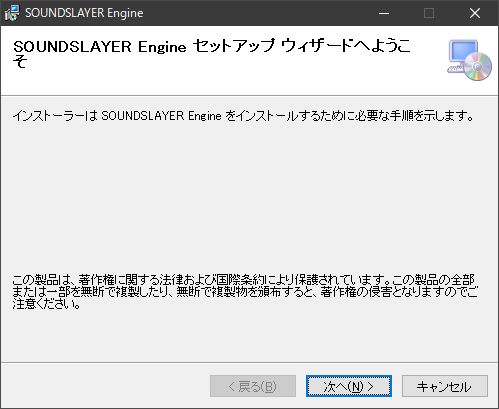
STEP5. インストールが完了すると、SOUNDSLAYER Engineが起動します。
STEP2. SOUNDSLAYER Engine v1.0.0 がインストールされている場合は、以下の手順でアンインストールしてください。
- SOUNDSLAYER Engine v1.0.0 をアンインストールする手順(クリックで開きます)
-
-
STEP2-1: スタートメニューを開く
画面の左下にある「スタート」ボタン(Windowsのロゴ)をクリックします。
または、キーボードの「Windowsキー」を押してもスタートメニューが開きます。 -
STEP2-2: 設定を開く
スタートメニューが開いたら、左側のメニューから「設定」(歯車のアイコン)をクリックします。
-
STEP2-3: アプリを選択する
設定画面が表示されたら、「アプリ」をクリックします。
これにより、インストールされているアプリの一覧が表示されます。 -
STEP2-4: SOUNDSLAYER Engineを探す
アプリの一覧から「SOUNDSLAYER Engine」を探します。
一覧はアルファベット順に並んでいるため、下にスクロールするか、検索バーに「SOUNDSLAYER」と入力して探してください。 -
STEP2-5: アンインストールする
SOUNDSLAYER Engineが見つかったら、そのアプリをクリックします。
表示されたオプションの中から「アンインストール」をクリックします。
確認メッセージが表示されたら、「アンインストール」を再度クリックして、アンインストールを開始します。 -
STEP2-6: アンインストールの完了
アンインストールが完了するまで待ちます。完了したら、画面に完了のメッセージが表示されます。
-
STEP2-7: 設定を閉じる
設定画面を閉じて、作業は完了です。
-
STEP2-1: スタートメニューを開く
STEP3. ダウンロードしたSOUNDSLAYEREngine-2_2_0.msixをダブルクリックしてください。
STEP4. インストールが始まります。
インストールウィザード画面が表示されたら、画面の指示に従ってインストールを進めてください。
STEP5. インストールが完了すると、SOUNDSLAYER Engineが起動します。
スタートメニューから「SOUNDSLAYER Engine」を選択しても起動できます。
STEP1. Please close all running software.
STEP2. If SOUNDSLAYER Engine v1.0.0 is installed, please uninstall it using the following steps.
STEP3. Double-click the downloaded SOUNDSLAYEREngine-2_2_0.msix file.
STEP4. The installation will begin.
STEP5. Once the installation is complete, SOUNDSLAYER Engine will launch.
STEP2. If SOUNDSLAYER Engine v1.0.0 is installed, please uninstall it using the following steps.
- How to uninstall SOUNDSLAYER Engine v1.0.0 (Click to open)
-
-
STEP2-1: Open the Start menu
Click the "Start" button (Windows logo) at the bottom left of the screen.
Alternatively, you can also open the Start menu by pressing the "Windows key" on your keyboard. -
STEP2-2: Open Settings
When the Start menu opens, click "Settings" (gear icon) from the menu on the left.
-
STEP2-3: Select Apps
When the Settings screen appears, click "Apps".
This will display a list of installed apps. -
STEP2-4: Find SOUNDSLAYER Engine
Find "SOUNDSLAYER Engine" in the list of apps.
The list is in alphabetical order, so scroll down or enter "SOUNDSLAYER" in the search bar to find it. -
STEP2-5: Uninstall
When you find SOUNDSLAYER Engine, click the app.
Click "Uninstall" from the displayed options.
When a confirmation message appears, click "Uninstall" again to start the uninstallation. -
STEP2-6: Wait for uninstallation to complete
Wait until the uninstallation is complete. When finished, a completion message will be displayed.
-
STEP2-7: Close Settings
Close the Settings screen to finish.
-
STEP2-1: Open the Start menu
STEP3. Double-click the downloaded SOUNDSLAYEREngine-2_2_0.msix file.
STEP4. The installation will begin.
When the installation wizard screen appears, follow the on-screen instructions to proceed with
the installation.
STEP5. Once the installation is complete, SOUNDSLAYER Engine will launch.
You can also launch it by selecting "SOUNDSLAYER Engine" from the Start menu.