

 Digital AV Support > About product's security update support
About product's security update support
Refer to the table below for product's security update support status (as of June 2026)
* We've laid the standard for product's security update support for two years after launching the products.
Digital Cameras
| Category | Model | Security update supported | The relevant URL |
| S series | DC-S5M2X | Until Jul. 2025 | Click on download page |
| DC-S5M2 | Until Feb. 2025 | Click on download page | |
| DC-S5 | Until Oct. 2022 | Click on download page | |
| DC-S5D | Until Nov. 2022 | Click on download page | |
| DC-BS1H | Until Dec. 2023 | Click on download page | |
| DC-S1RM2 | Until Apr. 2027 | Click on download page | |
| DC-S1M2ES | Until Jun. 2027 | Click on download page | |
| DC-S1M2 | Until Jul. 2027 | Click on download page | |
| DC-S9 | Until Jul. 2026 | Click on download page | |
| DC-S1H | Until Oct. 2021 | Nil | |
| DC-S1 | Until Apr. 2021 | Nil | |
| G series | DC-GH7 | Until Aug. 2026 | Click on download page |
| DC-GH6 | Until Apr. 2024 | Nil | |
| DC-GH5M2 | Until Jul. 2023 | Click on download page | |
| DC-GH5S | Until Feb. 2020 | Nil | |
| DC-BGH1 | Until Dec. 2022 | Nil | |
| DC-G100D | Until Feb. 2026 | Click on download page | |
| DC-G97 | Until Mar. 2027 | Click on download page | |
| DC-G90 | Until Apr. 2021 | Nil | |
| DC-G9M2 | Until Dec. 2025 | Click on download page | |
| DC-G9 | Until Jun. 2020 | Nil | |
| DMC-G80 | Until Nov. 2018 | Nil | |
| DMC-G7 | Until Jul. 2017 | Nil | |
| Compact | DC-TZ99 | Until Feb. 2027 | Click on download page |
| DC-FZ80D / FZ82D | Until Aug. 2026 | Nil | |
| DC-FZ10002 | Until Apr. 2020 | Nil | |
| DMC-FZ330 | Until Oct. 2021 | Nil | |
| DMC-FZ2000 | Until Dec. 2018 | Nil | |
| DC-TZ300 | Until May. 2028 | Nil | |
| DC-L10 | Until Jun. 2028 | Nil |
Digital Video Cameras
| Series | Model | End of Security update support | The relevant URL |
| V series | HC-V900 | Until Dec. 2026 | Nil |
| HC-V800 | Until Apr. 2020 | Nil | |
| HC-V785 | Until Jul. 2024 | Nil | |
| HC-V380 | Until Mar. 2017 | Nil | |
| HC-VX3 | Until Dec. 2026 | Nil | |
| HC-VX1 | Until Apr. 2020 | Nil | |
| HC-VXF1 | Until Apr. 2020 | Nil | |
| HC-VX980 | Until Mar. 2017 | Nil | |
| X series | HC-X20 | Until Oct. 2024 | Click on download page |
| HC-X2 | Until Oct. 2024 | Click on download page | |
| HC-X2100 | Until May. 2027 | Click on download page | |
| HC-X2000 | Until Feb. 2022 | Nil | |
| HC-X1600 | Until Apr. 2027 | Click on download page | |
| HC-X1500 | Until Apr. 2022 | Nil | |
| HC-X1200 | Until Apr. 2027 | Click on download page |
(*1) You are requested to change your password when connecting to Wi-Fi.
See the description below for procedure of password change
* Refer to the Operating Instructions for further information.
For HC-V785
- Touch [Setup].
- Touch [INPUT], and enter the Password (6 characters).
- After finish entering the Password, touch [Enter].
- If the Password has already been set,
 is displayed.
- Touch [NEXT].
- Touch [INPUT], and enter the same Password again.
- After finish entering the Password, touch [ENTER].
- If the Passwords match with each other, a message is displayed.
- Touch [EXIT].
For HC-X2/X20
Set the user account and password for entry into the HC-ROP app.
- Select the [NETWORK] menu → [IP REMOTE] → [USER ACCOUNT].
- Enter the user account name and select [ENTER].
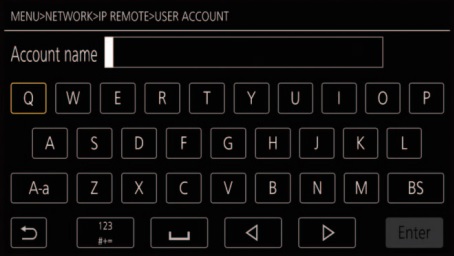
- Enter the user account name with 31 characters.
- Enter the password and select [Enter].
- Enter a password between 8 characters and 15 characters.