STEP 2. Download the updated version of the software with the following procedures, and copy the software file onto a microSD Memory Card. |
- Download and save the software onto your PC.
Please check the current version of software used by your camera carefully so that you will download a correct file.
| Current version of software |
Update File Name / Size |
Download |
| 11.0690 |
0P0000121100000600110690_0761.zip / 90,732,997 Byte |
 |
| 11.0709 |
0P0000121100000600110709_0761.zip / 87,137,330 Byte |
|
| 11.0728 |
0P0000121100000400110728_0761.zip / 22,481,698 Byte |
|
| 11.0739 |
0P0000121100000400110739_0761.zip / 21,421,289 Byte |
|
- Preparation of the microSD Memory Card.
The size of the "Update File" or more must be free on the microSD Memory Card.
- Insert your microSD Memory card to your SD slot of your PC.
If your PC does not have an SD slot, use an external USB SD Reader/Writer device.
If necessary, use a microSD card adapter.
- Copy the downloaded file onto the microSD Memory Card.
Copy the file into the "Download" directory under the Root directory (*1) of the microSD Memory Card.
If "Download" directory does not exist, make "Download" directory.
(*1) Root directory = The first or top-most directory in the hierarchy.
Note
- Please do not put more than one "Update File" in this directory.
- Please do not unzip or rename the downloaded file.
|
| STEP 3. Install the software update. |
- Please carry out full charge of DMC-CM1.
- Insert the microSD Memory Card prepared in STEP 2 into the DMC-CM1.
- From the Home screen ==> [
 ] ==> [ ] ==> [  ]. ].
- [About phone] ==> [System updates] ==> [Update from microSD].
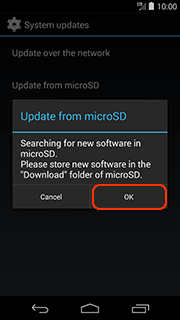
- After the message of "Update from microSD" is displayed, Press the [OK] button (Fig.1).
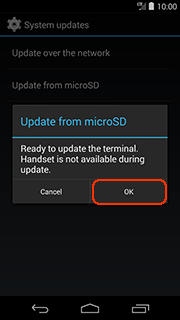
- After the next dialog is displayed, Press the [OK] button (Fig.2).
|
During software update, telephone calls, messages, various communication functions and other functions cannot be used. |
|
| < Fig.2 > |
|
|
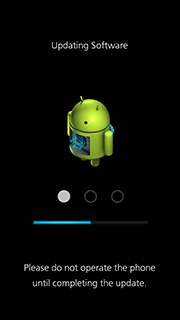
- The DMC-CM1 will start the update process (Fig.3).
Please do not attempt the following operations before completion of next step 8.
- Once the software update process is completed, the DMC-CM1 will turn on the power automatically.
- To verify the version number, follow Step1 at the beginning, the software version number indicates 11.0761, the process is completed.
Note
About the microSD Memory Card after it has been used for a software update.
Please delete software file used for the software update before taking photos, otherwise it may cause the DMC-CM1 to malfunction and/or decrease the number of pictures that can be taken.
|


 Digital AV Support > Digital Camera >
  Download > DMC-CM1 Software update service (Android 4.4) > Install the Software update