

Edit menu
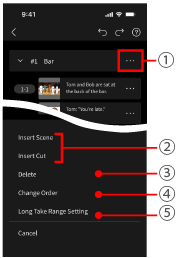
1View editing menu
2Insert scene or shot
Insert below scenes and shots where  was tapped in the Edit menu.
3Duplicate Shot
Duplicate the shot behind the one you tapped.
4Change scene or shot order
To rearrange scenes or shots, drag them by the right edge.
Scenes and shots are renumbered accordingly.
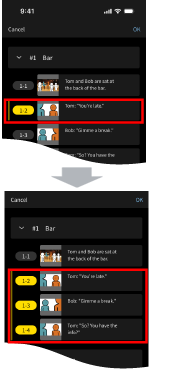
5Long take range
Set the long take range to indicate consecutive shots, such as conversation scenes, with a line on the left side of the shot to be recorded.
- Select the shot number of the first shot in the series.
- Select the shot number of the last shot in the series.
- When finished, tap [OK] in the upper right.
6Delete scene or shot
You can change or cancel the series of shots from the editing menu 1.