

Create a Shot List
[1. Create a storyboard]
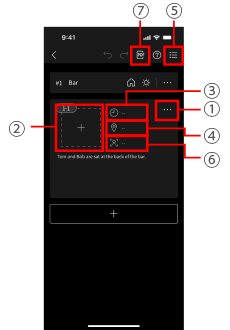
1Display the Edit menu
Scene and shot additions, etc. can be performed from the Edit menu.
2Switch to drawing screen
Insert images and easily create illustrations.
3Time per shot
Enter the time if you wish to allocate time to each shot.
The total length is also shown.
4Location
Enter the location. By selecting a location when it is time to record, you can restrict display to the shots to record at that location.
5Switch to list view
[2. Create a shot list]
6Group Shots
Shots with the same angle can be grouped together by setting the shot group name.
Shots and shot groups can be used as a shot list during recording.
[3. Share with staffers and performers]
7Export to PDF
You can export the storyboard as a PDF file.