

Create Project
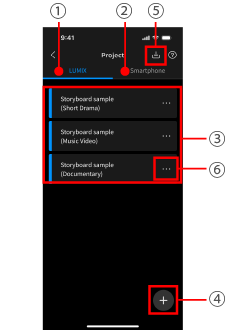
1LUMIX Mode
LUMIX Mode enables efficient, high-quality video production with a LUMIX camera even by a small group of people.
2Smartphone/Tablet Mode
In Smartphone/Tablet Mode, even without a LUMIX Camera, experience the fun of video production with just your smartphone.
3Projects
Three samples are provided for you to practice editing.
Editing a project automatically duplicates the original sample.
4New project
Choose from three workflows for different genres.
Workflow A: Scripted work
Workflow B: Music/dance video
Workflow C: Documentary/corporate video
5Import a project
You can import a project created with another LUMIX Flow app.
*Recorded data is not included.
6Rename, duplicate, delete, and export a project
Only the script, storyboard, and shot list data are duplicated.
Recorded data is not included.
The script and storyboard are deleted, but the recorded data saved on the camera’s memory card is not deleted.
Only the script, storyboard, and shot list data are saved to the smartphone as a .zip file.
The data can be imported to another smartphone, etc. to continue working.
Only the script, storyboard, and shot list data are duplicated.
Recorded data is not included.
Save the recorded data stored on the smartphone to a photo app.
The recorded data saved to the smartphone is deleted.