Digital AV Support > Blu-ray Disc™ Player/Recorder > Download > Firmware of PVR (DMR-PST500EF)
Firmware of PVR (DMR-PST500EF) (This Firmware can be updated via Over the Air Download only.)
Update Information
| Model Number | DMR-PST500EF |
|---|---|
| Update Version | Ver. 1.3.2 / 20140113_5994 |
| Update Date | 25th/Sep/2014 |
| Over the Air Download Schedule | From 25th/Sep/2014 |
Improvement
| Date/Version | Description |
|---|---|
| 25th/Sep/2014 Ver. 1.3.2 |
|
| 2nd/Aug/2012 Ver. 1.2.9 |
|
Check the firmware version currently installed in your Blu-ray Disc™ Player / HDD Recorder.
Follow the steps below to check the firmware version currently installed in your Panasonic Blu-ray Disc™ Player / HDD Recorder.
- Steps
- Turn on the main unit.
- Press "HOME MENU" button on the remote control to display HOME MENU, then select "Installation" by using Up and Down cursor buttons.
- Select "Information" on "Installation", then the focus moves to the right.
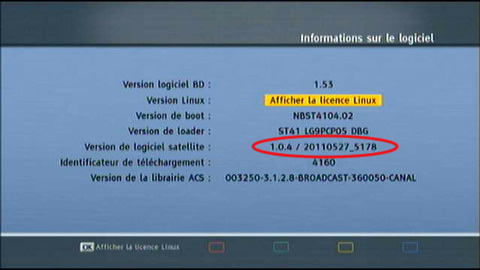
- Select "informations sur le logiciel", then "Version de logiciel satelite" will appear. (e.g. 1.04 / 20110527_5178)
Please make note of this version number.