

 Digital AV Support > Audio > Application > Connect your stereo system to the wireless router by using Panasonic Stereo System Network Setup (for Android)
Posted: October 1, 2026
[Important Notice] End of downloads for this app
Thank you for choosing Panasonic products.
Downloads of Panasonic Stereo System Network Setup will end as follows.
Smartphones running Android 13 or later: new downloads ended on May 1, 2023. If you have downloaded the app before with the same Google account, you can download it again until March 31, 2027.
Smartphones running Android 12 or earlier: the app will be available for download on Google Play until March 31, 2027. After that date, it will no longer be available for download, even if you have downloaded it before.
If the app is already installed, you can continue to use it. Please do not delete the app.
* Google Play™ is a trademark of Google LLC.
Connect your stereo system to the wireless router by using Panasonic Stereo System Network Setup
(for Android)
Network Setup is an application to connect the Panasonic network compatible stereo system to your home wireless router. By using this application, such as SSID input and setup in browser are not necessary and you can easily connect the stereo system to your home wireless network.
Preparation
- Connect your Android device to your home wireless network.
- Check the password for the home wireless network.
* iPad, iPhone, and iPod touch are trademarks of Apple Inc., registered in the U.S. and other countries.
Procedure to connect
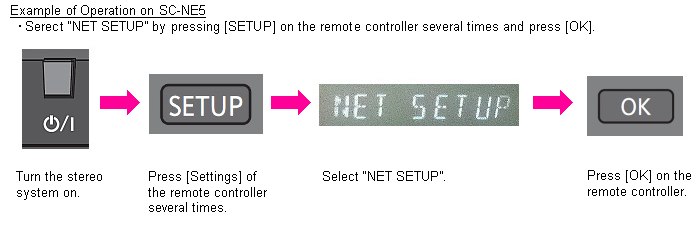
- Turn the stereo system on, and enter NET SETUP mode.
- Tap the Network Setup icon on iPhone/iPod touch/iPad to start Panasonic Stereo System Network Setup (Network Setup).

- Enter the password for the home wireless network on the display below.

- Enter the password and tap [Next].

- After communicated with the stereo system, the operation on the application side is completed.

- Connection is completed when the indication on the stereo system is changed from "LINKING" to "SUCCESS".

- Confirm that the Android device is connected to your home wireless network.
Frequently Asked and Questions (FAQ)
| Q01 | Which device works with Network Setup? |
|---|---|
| A01 | SC-NE3 and SC-NE5 work with Network Setup. (As of April 1st 2013.) |
| Q02 | Which Android device is supported to run Network Setup? |
|---|---|
| A02 | The devices with Android 2.2 or later are supported. (It does not mean to guarantee all Android devices.) |
| Q03 | "Cannot find a stereo system." is displayed. How can this be solved? |
|---|---|
| A03 |
|
| Q04 | "FAIL" is displayed. How can this be solved? |
|---|---|
| A04 |
|
| Q05 | Which languages are supported? |
|---|---|
| A05 | English, French and Japanese can be displayed. The displayed language is automatically changed by the Android device language setting. If the setting is set to a language other than English, French or Japanese, the displayed language is automatically set to English. |